Pro Subscription Bug
Hey,
a while ago I reported the problem with the pro subscription. I just re-subscribed again and the issue is still there. Does anyone know when it will be fixed?
And I noticed this issue is only there when I use Google Chrome. On Safari it is working.
Lelé wrote:
Hey,
a while ago I reported the problem with the pro subscription. I just re-subscribed again and the issue is still there. Does anyone know when it will be fixed?
It got fixed for everyone who reported it, so we need to understand what’s causing it specifically in your case.
Would you have some time to check a few things in your browser?
Merlls wrote:
It got fixed for everyone who reported it, so we need to understand what’s causing it specifically in your case.
Would you have some time to check a few things in your browser?
I sure can. Just let me know what I can do.
Lelé escreveu:
I sure can. Just let me know what I can do.
I'm just waiting our main dev to return so we can reply
Merlls wrote:
I'm just waiting our main dev to return so we can reply
Alright, no worries.
Lelé escreveu:
Alright, no worries.
Open the Zero Charts page in Google Chrome in https://zerocharts.com.br/stats
Open the Developer Tools console:
Windows/Linux: press
Ctrl + Shift + JMac: press
Cmd + Option + J(Or press
F12/ right-click → Inspect, then click the Console tab at the top.)
With the Console tab open, reload the page (
Ctrl + R/Cmd + R) so all the errors show up.Take a screenshot of the whole console, making sure the red error messages are visible:
Windows:
Win + Shift + SMac:
Cmd + Shift + 4

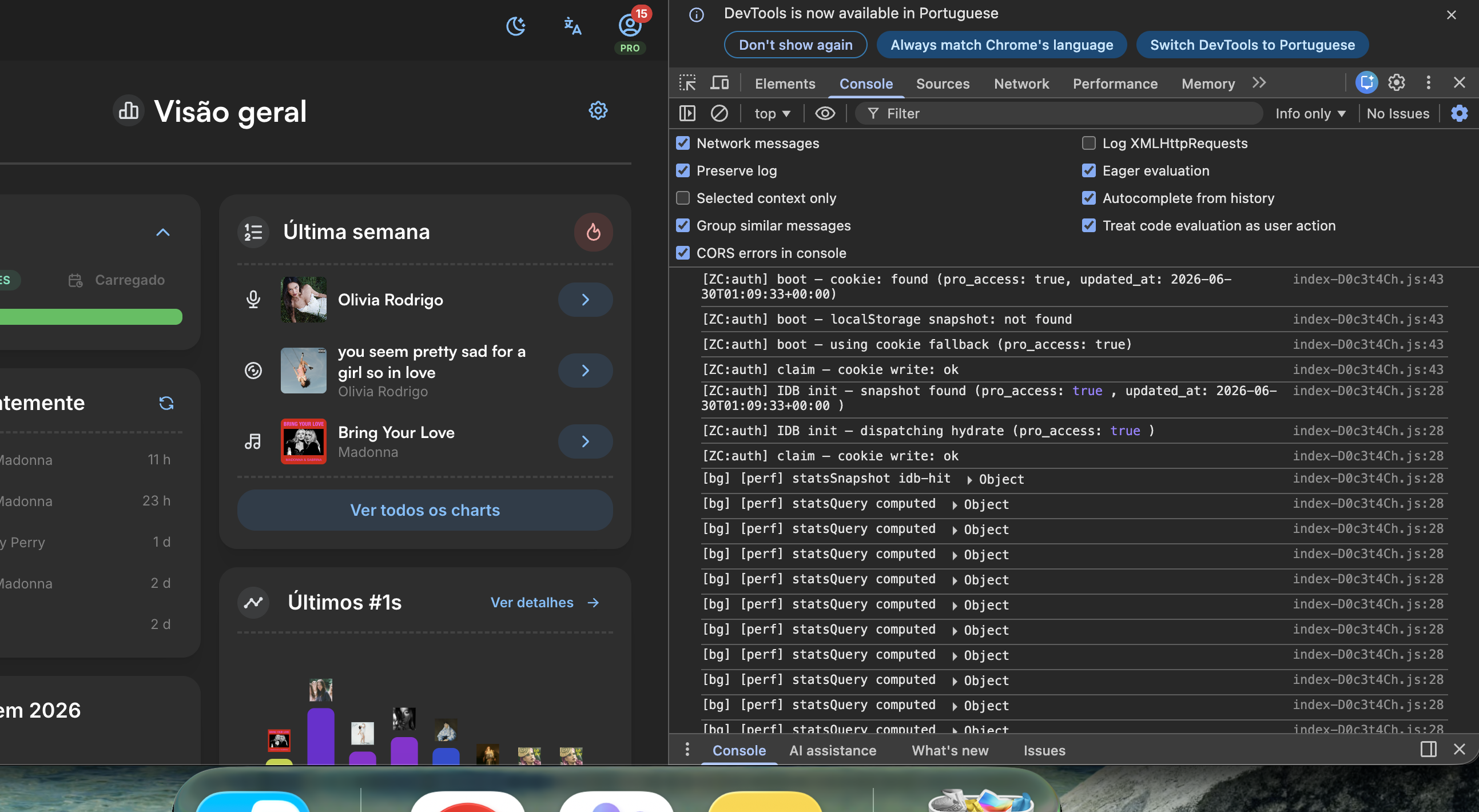
Check if these texts are also showing
Merlls wrote:
Open the Zero Charts page in Google Chrome in https://zerocharts.com.br/stats
Open the Developer Tools console:
Windows/Linux: press
Ctrl + Shift + JMac: press
Cmd + Option + J(Or press
F12/ right-click → Inspect, then click the Console tab at the top.)With the Console tab open, reload the page (
Ctrl + R/Cmd + R) so all the errors show up.Take a screenshot of the whole console, making sure the red error messages are visible:
Windows:
Win + Shift + SMac:
Cmd + Shift + 4Check if these texts are also showing
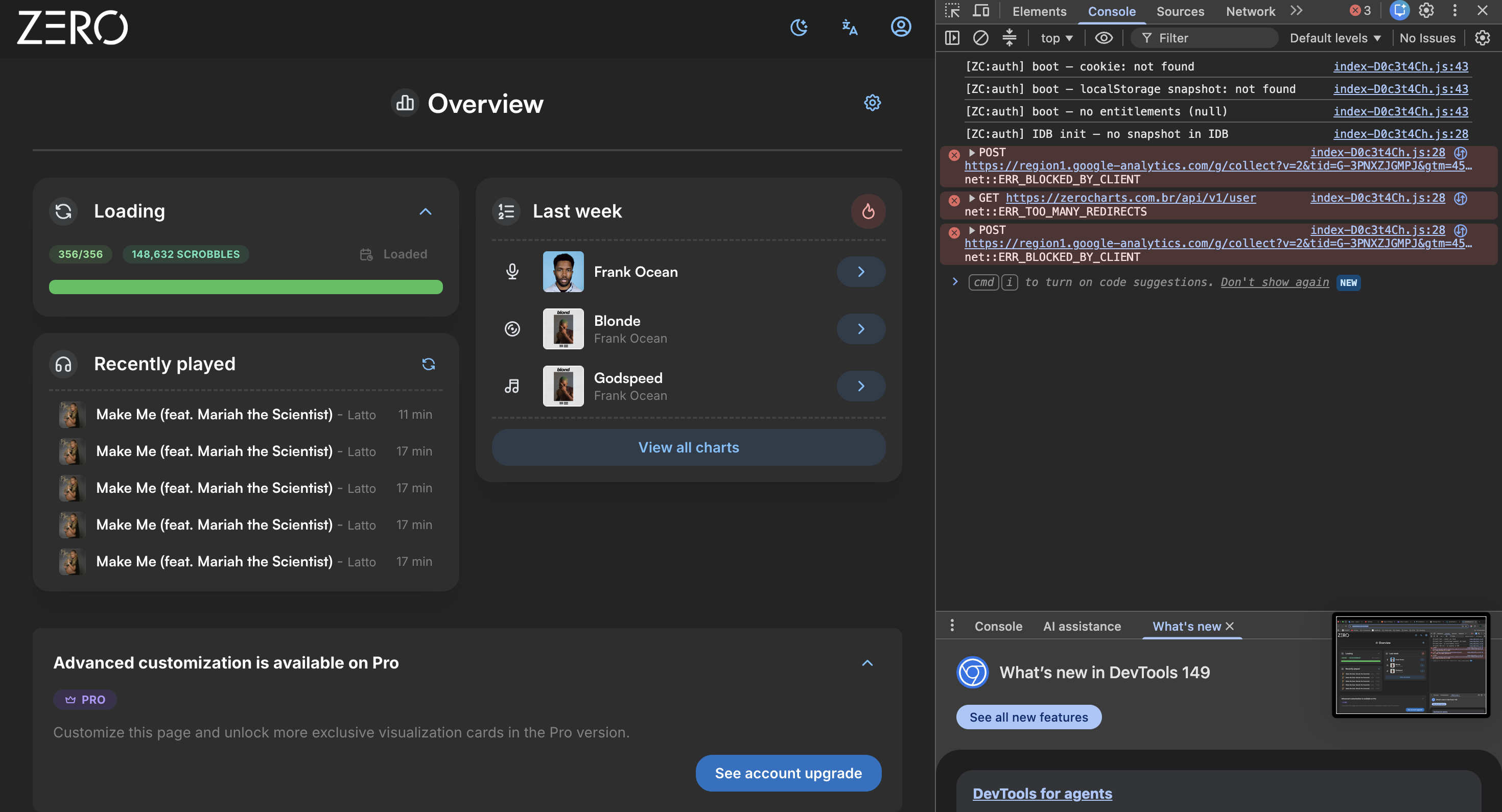
So, I followed those steps, and only this comes up:
Let me know if I should do something else.
Lelé escreveu:
So, I followed those steps, and only this comes up:
Let me know if I should do something else.
Step 1
Copy and paste this into Chrome’s address bar and press Enter:
chrome://net-internals/#hsts
Scroll down to the section "Delete domain security policies"
In the text field, type: zerocharts.com.br
Click the Delete button
Close that tab and try accessing ZeroCharts again.
If it still doesn’t work, move to Step 2:
Step 2
Copy and paste this into the address bar:
chrome://settings/content/all
In the search box on that page, type: zerocharts
Click on zerocharts.com.br in the list
Click the "Clear data" button
Confirm and try accessing the site again.
Merlls wrote:
Step 1
Copy and paste this into Chrome’s address bar and press Enter:
chrome://net-internals/#hstsScroll down to the section "Delete domain security policies"
In the text field, type: zerocharts.com.br
Click the Delete buttonClose that tab and try accessing ZeroCharts again.
If it still doesn’t work, move to Step 2:
Step 2
Copy and paste this into the address bar:
chrome://settings/content/allIn the search box on that page, type: zerocharts
Click on zerocharts.com.br in the list
Click the "Clear data" button
Confirm and try accessing the site again.
Step 1 did not work, and Step 2 also did not work for me too. Now I had to reload all the charts and all of my album cover changes that I did are gone.
Lelé escreveu:
Step 1 did not work, and Step 2 also did not work for me too. Now I had to reload all the charts and all of my album cover changes that I did are gone.
First of all, we’re very sorry for the inconvenience you’ve been experiencing. We’re willing to offer you several months of PRO as compensation.
We were able to locate six cover changes made to your PRO account. Unfortunately, the rest were not saved to the cloud due to this bug. We believe a Chrome extension may be preventing the subscription feature to work properly on your browser.
Please try using the site in Incognito Mode. Open a new incognito tab and login. See if you check the PRO features. Then we can confirm whether that is the cause.
BADOMENS wrote:
First of all, we’re very sorry for the inconvenience you’ve been experiencing. We’re willing to offer you several months of PRO as compensation.
We were able to locate six cover changes made to your PRO account. Unfortunately, the rest were not saved to the cloud due to this bug. We believe a Chrome extension may be preventing the subscription feature to work properly on your browser.
Please try using the site in Incognito Mode. Open a new incognito tab and login. See if you check the PRO features. Then we can confirm whether that is the cause.
No no, I love to support the work you guys do. I have been a fan of Zerocharts since 2018 and also donated before this new website was launched. I don't want any free months or anything else.
For whatever reason, it works now in my normal browser. Not sure how or why, but thank you guys so much and I am sorry for stressing you guys out.
Lelé escreveu:
No no, I love to support the work you guys do. I have been a fan of Zerocharts since 2018 and also donated before this new website was launched. I don't want any free months or anything else.
For whatever reason, it works now in my normal browser. Not sure how or why, but thank you guys so much and I am sorry for stressing you guys out.
Thank you for the support and let us know if anything happens again please. We're glad to help everyone.